
If you are buying business laptops for a team this year, the machine matters less than the moment. 2026 is the first year in a decade where the hard question is not which model is best. It is what a model costs, what it actually ships with, and whether the number on your quote survives until the purchase order clears.
Here is what changed, what to buy, and what to check before you sign.
All prices and specifications observed July 2026. In this market, verify before you quote.
What Changed in 2026
Memory Is Now a Third of the Machine
HP told investors that DRAM went from roughly 15 to 18 percent of a PC bill of materials to about 35 percent in a single quarter. Gartner, forecasting across the whole industry rather than one vendor, expects memory to peak at 23 percent of bill of materials, up from 16 percent in 2025. Take the lower number and it is still the fastest cost shift this category has seen in years.
Dell raised prices 15 to 20 percent effective mid December 2025. Lenovo followed on January 1, 2026. IDC now forecasts PC average selling prices rising 18.3 percent across 2026 while shipments fall 11.3 percent. Gartner arrives in the same place from a different direction: prices up 17 percent, shipments down 10.4 percent. IDC second quarter numbers came in at 68.2 million units, down 4.9 percent, the first decline in two years.
Prices up, volume down, and IDC does not expect memory supply to recover until early 2028.
Your Quote Is Not a Price
This is the most useful sentence in this article, so read it twice.
Dell told corporate buyers that ordering today for future delivery does not lock in current prices. Lenovo expired outstanding quotes on January 1, 2026. Buyers are reporting refresh quotes landing 30 to 60 percent above budget, with price validity windows measured in hours instead of weeks.
If you are scoping a 100 unit refresh against a quote from six weeks ago, confirm it in writing before you plan around it.
The Same Model Ships With Less
In January, Gartner warned that vendors would answer memory costs with specification downgrades, especially at entry level. That is exactly what happened.
In late July 2026, Dell own configurator showed a Dell Pro 5 Series 14 above $2,200 carrying 8GB of single channel memory and a 256GB drive. Windows 11 runs on that. Copilot+ does not, because Microsoft requires 16GB. Neither does a real day of work with Teams, a browser, and anything else open.
Gartner expects this to run all the way to the bottom of the market, forecasting that the sub-$500 entry level PC segment disappears entirely by 2028.
Check the specification sheet, not the model name. The SKU you bought last year is not the SKU you are buying this year.
Before You Pick a Machine, Fix Your Refresh Math
The Windows 10 Deadline Already Passed
Support ended October 14, 2025. If you are reading this in 2026 with Windows 10 still in production, you are not early and you are definitely not alone. You are exposed.
Lansweeper telemetry from mid 2026 puts 16.9 percent of Windows client devices still on Windows 10. Those machines average 1,903 active CVEs each, against 652 on Windows 11. Two thirds of the Windows 10 vulnerabilities are rated high or critical.
What Extended Security Updates Actually Cost
Commercial ESU runs $61 per device for year one, $122 for year two, and $244 for year three. Three years maximum.
Here is the part that catches people: it is cumulative. Enrolling in year three means paying for years one and two as well. That is $427 per device to keep running a machine you were already planning to replace.
Microsoft quietly extended the consumer ESU program to October 12, 2027. Do not build a plan on it. Consumer ESU is explicitly unavailable for devices joined to Active Directory, Microsoft Entra, or under MDM management. It is not a fleet strategy.
Hardware Is No Longer the Blocker
This one surprised me.
For two years the story was that old hardware could not run Windows 11: no TPM 2.0, unsupported processor. That group has largely aged out. Lansweeper data from July 2026 found only 2.8 percent of remaining Windows 10 systems actually fail the Windows 11 hardware requirements.
What is left is inertia, application compatibility, and budget. Those are management problems, not procurement problems. If your Windows 10 machines can take Windows 11, upgrading them buys you time to refresh on your schedule instead of the market schedule.
The floor, if you need it: Intel 8th generation Core or AMD Ryzen 2000 is the oldest supported silicon. A business machine bought before 2018 is almost certainly out. Anything from 2018 or 2019 needs to be inventoried individually rather than assumed.
The Best Business Laptops for 2026
Recommendations by job, not by best overall. A fleet is not one machine.
Dell: New Names, Two Generations on the Shelf
Dell rebranded twice. Latitude is gone. Commercial notebooks are now Dell Pro in numbered tiers: Pro 3, Pro 5, Pro 7, and Pro Premium. Mobile workstations are Dell Pro Precision. Rugged is Dell Pro Rugged.
Read the line before you read the number, because the numbers mean opposite things. In the Dell Pro line, higher numbers mean thinner and lighter with better battery life. In the Dell Pro Precision line, higher numbers mean more performance.
Now the thing that will save you real money. Dell is currently selling 2025 and 2026 generations side by side on the same page. Model codes ending in 250 or 255 are last year. Codes ending in 260 or 265 are current. In late July a 2025 Dell Pro 14 listed around $959 while a 2026 Dell Pro 5 Series 14 listed around $2,259. Same page, same day, roughly 2.4 times the price.
If your workload does not need Core Ultra Series 3, last generation is the value buy of the year. Confirm the support runway before you commit.
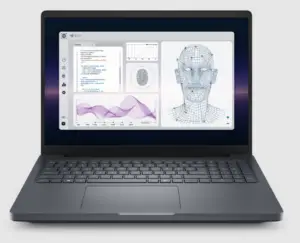
Pick Dell when you want a standardized BIOS across Intel and AMD, which genuinely simplifies imaging, or when cloud based Intel vPro provisioning for zero touch deployment matters to a small IT team.
HP: Read the Letter at the End
HP 2026 commercial line uses a numbered tier plus a silicon suffix, and the letter is the specification. The letter i means Intel. The letter a means AMD. The letter q means Qualcomm Snapdragon.
Therefore, EliteBook X G2i is Intel, EliteBook X G2a is AMD, EliteBook 6 G2q is Snapdragon. ProBook 4 G2 sits below EliteBook. ZBook 8 and ZBook X are the mobile workstations.
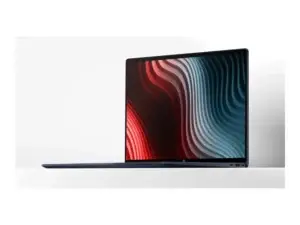
HP publishes no US list pricing on this generation, so every number you find is reseller street pricing. Expect to quote.
Pick HP when endpoint security is the deciding factor. Wolf Security is hardware enforced, Sure Start is a self healing BIOS, and Wolf Protect and Trace can locate, lock, and erase a machine remotely even when it is powered off or off the internet.
One catch to know before you order rather than after: Protect and Trace requires a Cat-M, 4G LTE, or 5G module specified at build time. You cannot add it later. If a lost laptop is a compliance event in your world, specify it on the first order.
Lenovo: Boring Names, Best Repairability
Lenovo renamed nothing. ThinkPad T, X, L, and E still mean what they have always meant. In a year when two competitors reshuffled their catalogs, that is worth something on its own.
Current generation is ThinkPad T14 Gen 7 and T16 Gen 5, X13 Gen 7, L14 Gen 7 and L16 Gen 3, and X1 Carbon Gen 14.
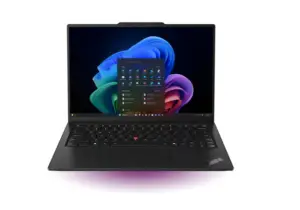
The T14 Gen 7 and T16 Gen 5 earned a 10 out of 10 iFixit repairability score, and the T14 uses LPCAMM2 replaceable memory.
Read that again in the context of the first section. In a year when memory is 35 percent of what the machine costs and prices are still climbing, a laptop whose RAM you can replace in three years is not a specification sheet curiosity. It is a hedge.
Pick Lenovo when you are extending your refresh cycle, when in house repair matters, or when you want factory imaging that ships machines preconfigured straight from manufacturing.
Samsung: A Real Entry With One Catch
Samsung Galaxy Book6 Enterprise Edition arrived April 30, 2026 in 14 and 16 inch. Intel Core Ultra Series 3, up to 49 TOPS, Knox security, discrete TPM, and genuine deployment support including custom imaging, BIOS configuration, asset tagging, and Windows Autopilot.

The catch is specific and it matters: vPro is only available on the 14 inch model. The 16 inch tops out on a non vPro chip. If your management story runs through Intel AMT, the 16 inch is off the table no matter how well the rest of the specification reads.
Samsung published no pricing and no fleet service tier comparable to ProSupport, Active Care, or Premier Support. Treat it as a strong niche play, especially where users already live in the Galaxy ecosystem, not as a fourth full line alternative.
Rugged: When the Job Site Is the Spec
Dell Pro Rugged, Panasonic Toughbook, and Getac cover this ground, and the price jump is steep. Using Dell as the benchmark, semi rugged runs roughly 2 to 2.6 times a mainstream commercial notebook and fully rugged runs close to five times. Budget $2,000 to $4,000 for semi rugged and $4,000 to $7,000 or more for fully rugged.
MIL-STD-810H appears on essentially every rugged model sold, so it differentiates nothing. The real questions are IP rating, drop height, and whether you need MIL-STD-461G for electromagnetic interference.
Check the silicon generation carefully here. Rugged lines refresh on longer cycles, and some models still ship processors two or three generations behind their mainstream siblings.
What Actually Matters in a Fleet Spec
Out of Band Management Is the Real Decision
Almost everything else on the specification sheet is negotiable. This is not.
Intel vPro includes Active Management Technology, which lets you discover, configure, patch, repair, and retire machines remotely, including when the operating system will not boot. AMD commercial parts use DASH, the vendor neutral DMTF standard, plus AIM-T.
Both work. They are not the same tooling. If you standardize on AMD, your management stack has to speak DASH, not AMT. Decide this before you shortlist models, not after.
For Arm based machines, ask the vendor directly what the out of band story is. Do not assume parity.
Copilot+ Is the Floor, Not a Feature
Microsoft Copilot+ bar is a 40 TOPS NPU, 16GB of RAM, and a 256GB drive.
Every current generation commercial part clears it comfortably. Intel Core Ultra Series 3 reaches up to 50 TOPS. AMD Ryzen AI PRO 400 goes to 60. Snapdragon X2 Elite is rated at 80, and HP markets its Snapdragon EliteBooks at up to 85.
Which means that in 2026, the phrase AI PC on a commercial quote tells you nothing at all. Everything qualifies. What does not automatically qualify is the 16GB of memory, because memory is exactly what vendors are trimming to hold a price point. Check the RAM line.
Memory You Can Replace
Given where DRAM pricing is heading, soldered memory is a bet that you will replace the whole machine rather than upgrade it. That was a reasonable bet in 2022. It is a more expensive bet now.
Where a model offers replaceable memory, price the difference. It may pay for itself exactly once, and once is enough.
Warranty and Support: Where the Money Hides
Compare Bundles, Not Brochures
The tiers sound equivalent across vendors. They are not.

Lenovo Premier Support Plus bundles accidental damage protection and keep your drive into the tier. Dell sells both as add ons on top of ProSupport Plus. A like for like comparison is Premier Support Plus against ProSupport Plus plus accidental damage plus Keep Your Hard Drive, not against ProSupport Plus alone.
Coverage terms differ too. Dell ProSupport Plus accidental damage is contractually capped at one qualified incident per product per rolling 12 months, and it does not accumulate. Lenovo standard accidental damage protection allows multiple repairs per year, though the cheaper ADP One variant allows one repair for the entire coverage period. Read which one is actually on the quote.
Buy Support at Point of Sale
Adding coverage later costs materially more.
On Dell configurator in July 2026, adding ProSupport Plus to a Dell Pro ran under $80 for a 12 month increment. A comparable after the fact upgrade SKU at a reseller listed above $200. Same coverage, different moment, roughly two and a half times the price.
HP is stricter about it. Care Packs must be purchased within 90 days of the hardware.
The Fine Print That Bites
Three things that surface after the incident instead of before it.
Dell Keep Your Hard Drive does not apply to soldered drives. On thin commercial chassis that gap is getting wider every generation, and for regulated or public sector buyers who cannot let a drive leave the building it is a genuine problem. Confirm it per model.
Dell ProSupport Flex requires 1,000 or more devices. If you are buying 50 to 500 units it is not available to you, so plan around ProSupport Plus.
HP Active Care proactive features depend on TechPulse being deployed and the devices staying connected. Without the agent in place, you are paying for next business day onsite and not much else.
Public Sector Buyers: Three Things to Get Right
Your Vehicle Expires Inside Your Refresh Window
This is a timing problem almost nobody catches in time.
GSA Governmentwide Strategic Solutions BPAs are now the designated vehicles for federal laptop and desktop purchases, and the ordering period runs through September 3, 2027. NASPO ValuePoint Computer Equipment master agreement expires June 30, 2027, with renewals capped at June 30, 2028.
Both land inside the window where a lot of organizations will still be executing their Windows 10 exit. If your refresh plan runs past mid 2027, confirm your vehicle before you build a schedule on top of it.
TAA Is a Line Item Question
Trade Agreements Act compliance is a manufacturing origin question at the SKU level, not a brand level question. All three major vendors sell compliant and non compliant configurations of the same model.
Require TAA certification per line item on the quote. Do not accept a brand level assurance, because a brand level assurance is not one.
Ask for the ACR Before You Shortlist
Section 508 conformance is mandatory for Executive Branch agencies, and FAR 39.203(c) requires testing regardless of source, including commercial off the shelf products.
Request the manufacturer Accessibility Conformance Report or VPAT for every model under consideration, document why you selected the one you selected, and do not treat a vendor self certification as the end of the obligation.
One more note on timing: the Revolutionary FAR Overhaul entered formal rulemaking in June 2026 and covers Part 39, Information Technology, among others. Anything you cite from the FAR right now should carry a date.
How to Buy in 2026
Six moves, in order.
Inventory before you shop. You may have far fewer machines that genuinely need replacing than your calendar says. Only 2.8 percent of remaining Windows 10 systems fail the Windows 11 hardware bar, and Forrester found 26 percent of companies already getting four or more years out of a laptop.
Refresh by role, not by date. A calendar based standard made sense when prices fell every year. They are not falling.
Consolidate suppliers rather than switching them. Forrester read is that changing vendors is unlikely to produce material savings, while concentrating volume with one creates leverage.
Confirm every quote in writing before you plan around it. See section one.
Normalize specifications before you compare prices. Memory, drive, Windows edition, warranty term. Cross vendor price comparison without that step is actively misleading this year.
Buy the longer support term. If the fleet is going to be held longer than planned, and most will be, a four or five year contract bought at today price hedges both the extension and the next round of increases.
None of this makes the decision for you, and that is the point. The right laptop for a field crew is wrong for a finance team, and the right answer this quarter may not survive the next memory contract. What does not change is the discipline. Know what you actually have. Specify what the work actually needs. Get the terms in writing.
If you want a second set of eyes on a refresh you are scoping, that is the work we do. Start a conversation, or see how we work to help you land. We put the value in each request, well beyond a simple reseller. We’ll guide you to make a smart acquistion.